
Windows Error Reporting Service服务是什么?可以关闭吗?怎么关闭?
Windows Error Reporting Service服务是什么?Windows系统错误报告服务,每次你的系统出错,弹出来的“发送不发送”,这是微软错误反馈,用来收集用户系统发生的错误的服务Windows Error Reporting Service可以关闭吗?如果电脑性能不是很好的话建议关闭,如果电脑性能优秀的话建议开启,毕竟这些错误的信息有助于微软帮我们改善系统,是跟我们的利益切身相关的Windows Error Reporting Service服务怎么关闭?1、首先按下Win+R,输入services.msc,我们就可以看到所有服务项了。
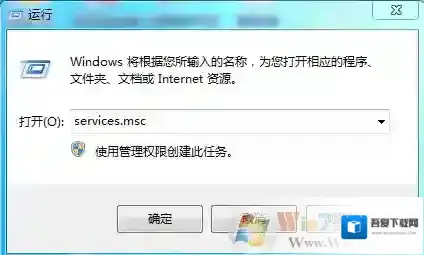
Windows7服务
2、在服务中找到Windows Error Reporting Service服务,
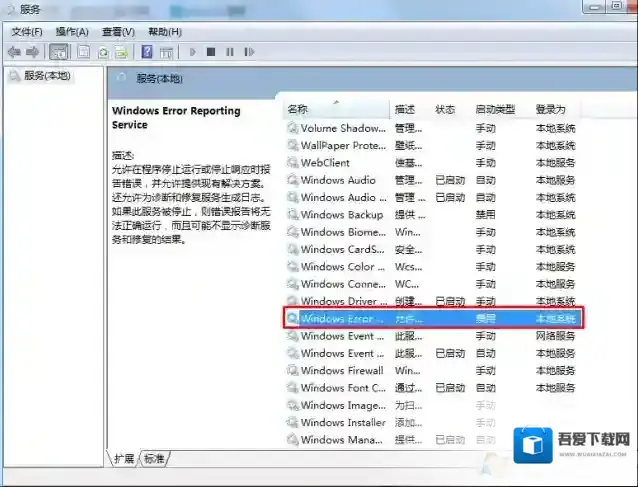
Windows7怎么关闭
3、双击打开,选择禁用并确定
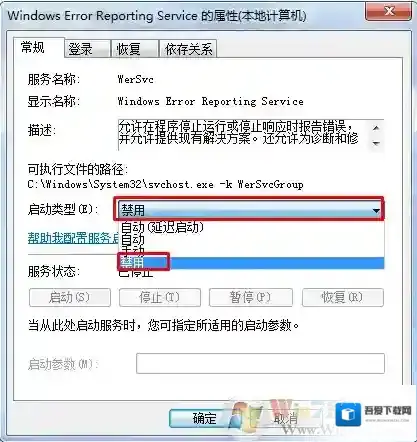
Windows7关闭
总结:Windows Error Reporting Service的功能介绍及关闭的方法了,希望对大家有帮助
Windows7软件相关内容
-
Windows资源管理器总是停止工作解决方法大全
在Win7系统中,使用操作系统的过程中经常遇到 “Windows资源管理器总是停止工作”的情况,给用户使用电脑造成了很大的干扰。那如何修复win7总是出现资源管理器停止工作的问题呢,或许以下小编整理的方法可以帮助你修复。 Windows7停止工作 方...2025-09-24 -
Spoolsv.exe应用程序错误怎么办?Spoolsv.exe应用程序错误修复方法
一些朋友在电脑上使用打印的时候出现“Spoolsv.exe应用程序错误”的问题,很多用户都不知道如何去解决,修复Spoolsv.exe应用程序错误,那么这里Win7系统之家小编就和大家分享下方法。 Windows7应用程序错误 Spoolsv.exe...2025-09-14