Win10自带应用卸载与恢复的操作方法
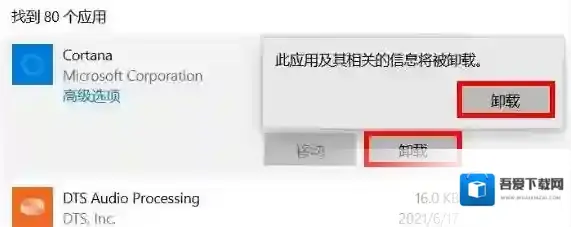
Win10自带应用有很多,但是无法通过常规卸载手法来将他们删除!winwin7在这里给大家亮一手,教你快速卸载win10无法卸载的一些APP,卸载了也不懂担心,自有恢复方法!
Windows10卸载
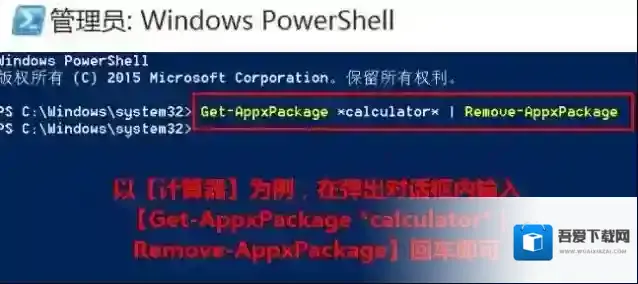
1.Win+Q调出搜索框,搜索并找到Windows Powershell,右击选择以管理员身份运行。2.以计算器为例,在弹出对话框内输入Get-AppxPackage *calculator* | Remove-AppxPackage回车。
Windows10应用卸载
3.替换Get-AppxPackage *calculator* | Remove-AppxPackage,可以卸载更多应用:人脉:Get-AppxPackage *people* | Remove-AppxPackageGroove音乐、电影与电视:Get-AppxPackage *zune* | Remove-AppxPackage地图:Get-AppxPackage *map* | Remove-AppxPackageOneNote:Get-AppxPackage *OneNote* | Remove-AppxPackage3d:Get-AppxPackage *3d* | Remove-AppxPackageCamera相机:Get-AppxPackage *camera* | Remove-AppxPackage邮件和日历:Get-AppxPackage *communi* | Remove-AppxPackage新闻订阅:Get-AppxPackage *bing* | Remove-AppxPackageXbox:Get-AppxPackage *xbox* | Remove-AppxPackage(卸载Xbox可能会报错,其实已卸载,忽略就好咯)
恢复win10应用的方法
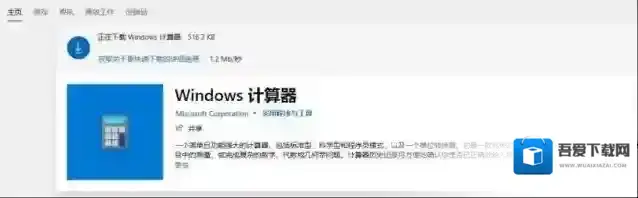
进入“Windows应用商店”,右上方搜索栏输入要下载的应用名称,找到后点击安装即可!
Windows10恢复
以上便是winwin7为大家分享介绍的Win10自带应用卸载与恢复的操作方法!
Windows10软件相关内容
-

-
-
Win7不知道怎么获取最新补丁怎么办?Win7如何获取最新补丁教程
众所周知每台电脑的系统经过使用都会发生一些系统的漏洞,而官方就会发布最新的补丁来修复这些系统的漏洞,然而有很多的小伙伴不知道如何去获取最新的补丁,其实不需要什么第三方软件,我们自己在系统上就能获取最新的补丁。下面就给小伙伴们带来获取最新补丁的教程。 ...2025-09-13 -
Win10 21H1镜像下载|Win10 21H1正式版ISO镜像下载
微软于2021年5月低调的发布了Win10 21H1版本,这次版本虽然并非很大的更新,但是依然受到了用户关注,目前微软已经分批向Win10系统用户推送Win10 21H1正式版,如果你没收到更新,或是想全新安装,那么还可以下载Win10 21H1IS...2025-09-13 -
Win10商店打不开代码:0x80131500解决方法
使用Win10操作系统的用户反应无法打开应用商店,提示:重试该操作 无法加载页面。请稍后重试。码:0x80131500的错误提示,是怎么回事呢?商店是win10系统中很多用户常用的用来下载app的地方,如果无法打开的话将会影响我们使用。针对这一问题小...2025-09-13 -
-
-
-